What OAIS Actually Looks Like in Small and Mid-Sized Organizations?
Let’s be honest. Most organizations are not NASA. Most archives are not running multi-million dollar preservation stacks with redundant data centers and in-house developers. Most of the places we work with at Backlog are schools, museums, foundations, associations, and mission-driven organizations that are doing their best with limited staff, limited budget, and a patchwork of tools.
And yet OAIS still applies.
The mistake is thinking OAIS only “counts” if you have a formal digital preservation platform, a preservation librarian, and a six-figure storage contract. OAIS is a reference model. It is a way of mapping responsibilities and workflows. You can absolutely apply it in a small historical society running on shared drives and Excel. You can apply it in a mid-sized institution using ArchivesSpace and LTO tapes. The scale changes. The logic does not.
Here is what OAIS looks like in practice when you are not a space agency.
Ingest: Where Chaos Either Gets Organized or Locked In
In a small or mid-sized organization, ingest is often messy. A donor drops off a hard drive. A staff member forwards a folder of PDFs. A shared Google Drive accumulates years of content with no version control. That is real life.
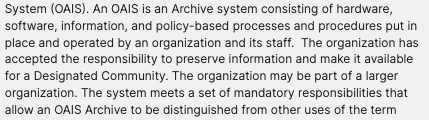
Under OAIS, ingest is the moment you take responsibility.
At Backlog, when we step into a digital environment, we treat ingest as a defined phase. That means:
We capture exactly what was received and when.
We document file counts and formats.
We run virus scans.
We record basic metadata about origin and context.
We preserve original order at the file system level, even if we later create a cleaner access structure.
If you are a small organization, ingestion might mean copying a donor’s drive to a controlled environment, documenting its contents in a spreadsheet, and recording the transfer details in a formal acquisition record. It might mean exporting a departing staff member’s email and documenting its contents.
It does not have to be Archivematica. It does have to be intentional.
One of the biggest problems we see in assessments is that organizations skip structured ingest. Files get dropped into a network drive and renamed. Original folder structures disappear. Context gets stripped out. That makes long-term preservation harder, not easier.
In OAIS terms, this is where your Submission Information Package takes shape. Even if you never say “SIP” out loud, you are still creating one.
Archival Storage: Where You Decide What You Actually Care About
Small and mid-sized organizations often confuse “storage” with “preservation.” They are not the same. Storage is where something lives today. Preservation is how you make sure it survives tomorrow.
Under OAIS, archival storage is responsible for maintaining integrity and retrievability over time. In practice, that might look like:
Maintaining master TIFFs or high-resolution scans separate from access JPEGs.
Using LTO tapes for long-term storage, with documented migration plans.
Maintaining redundant cloud storage with clear retrieval procedures.
Running fixity checks on critical collections.
Keeping an offline copy in a geographically separate location.
We have worked with organizations that use Amazon S3 and Glacier for deep storage. We have worked with institutions that rely on LTO migration cycles. We have also worked with smaller groups where “archival storage” is a well-managed external hard drive system with documented duplication and rotation procedures.
What matters is not the tool. What matters is that you can answer these questions:
Where are the preservation masters?
How many copies exist?
How do you know they have not changed?
What is the plan when this storage medium becomes obsolete?
That is OAIS thinking. This is also where the Archival Information Package lives. It is the version you are committing to maintain, complete with preservation metadata and integrity information. Even if your AIP is simply a folder with checksums and a documented structure, you are operating within the model.
Data Management: Metadata Is Not Optional
In small environments, metadata often gets treated as aspirational. There is a plan to “add that later.”
Under OAIS, data management is not decorative. It is a core function. If you cannot identify, describe, and track your digital assets, you do not have a preservation program. You have a pile.
In our work, this is where tools such as ArchivesSpace, CollectiveAccess, PastPerfect, spreadsheets, and structured Word documents come into play. We have implemented folder-level inventories. We have built structured metadata schemas aligned with descriptive, structural, and administrative standards. We have formalized naming conventions and retention categories.
Metadata in a small organization might live in:
ArchivesSpace with linked digital objects.
A well-structured Excel inventory.
A DAMS with descriptive and technical fields.
A controlled Google Sheet that tracks file integrity and location.
It does not have to be elegant. It does have to be consistent.
Preservation Planning: The Piece Everyone Forgets
Preservation planning is the most overlooked function in small and mid-sized organizations. It is also the one that separates digital hoarding from digital stewardship.
Preservation planning asks:
What formats are we receiving?
Are those formats sustainable?
What is our migration strategy?
What happens when this software platform sunsets?
What is our risk tolerance?
We have seen organizations sitting on decades of WordPerfect files. We have seen CDs degrading in file cabinets. We have seen proprietary database exports that no one knows how to reopen.
Preservation planning does not mean panic migration. It means documenting decisions and revisiting them.
It might look like:
Converting obsolete formats to stable, open formats.
Monitoring vendor stability before signing long-term contracts.
Documenting migration timelines for LTO tape cycles.
Writing a short internal technology watch memo once a year.
You do not need a digital preservation officer. You do need someone assigned to ask these questions.
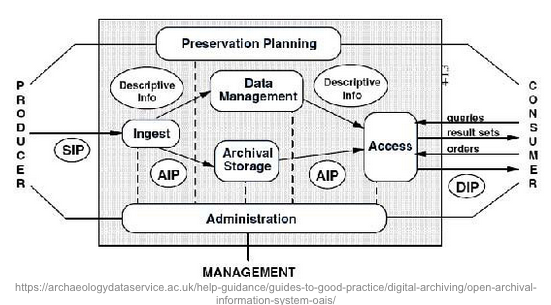
Access: The DIP Is What Your Users Actually See
OAIS distinguishes between what you preserve and what you deliver. In practice, this is the difference between a 600 MB master image and a web-friendly derivative. It is the difference between a raw email archive and a searchable access interface. It is the difference between a high-resolution scan and the PDF a researcher downloads.
In many Backlog projects, we explicitly design this separation. The master files remain untouched in archival storage. The access copies are created intentionally, with documented workflows. This protects preservation assets while improving usability.
The Dissemination Information Package does not have to be complicated. It just has to be deliberate.
Administration: Someone Has to Own This
This is the part organizations often avoid. OAIS requires that an archive “accept responsibility.”
Responsibility means:
There is a defined preservation policy.
There are assigned roles, even if they are part-time.
There is documentation of decisions.
There is clarity about what the repository does and does not promise.
We have worked with boards and executive leadership to formalize these responsibilities. Sometimes it is as simple as a written policy that clarifies what digital materials are within scope and how they will be maintained. Sometimes it involves aligning digital preservation with a broader records retention schedule.
Without administrative commitment, the rest becomes informal and fragile.
Imperfect Tools Are Not a Disqualification
At Backlog, we rarely walk into a perfect environment. We see hybrid systems, legacy servers, vendor transitions, and decades of unstructured digital accumulation. OAIS is useful precisely because it does not require perfection.
You can map a Google Drive, an LTO rotation schedule, and an ArchivesSpace instance onto OAIS. You can map a shared server, structured spreadsheets, and external cloud storage onto OAIS. The question is not whether you have a specific product. The question is whether you can explain how your ingest, storage, metadata, planning, access, and administrative decisions work together.
OAIS gives you the vocabulary to do that. For small and mid-sized organizations, that vocabulary is power. It lets you assess your current state honestly. It lets you justify budget requests. It lets you design incremental improvements rather than chasing silver bullet solutions.
Most importantly, it reframes digital preservation from a technology problem to a responsibility problem. Once you accept responsibility, the model becomes a roadmap instead of a buzzword. And that is where real digital stewardship begins.
For more information on OAIS, watch our webinar here: