Fixity and Bagit: A Practical Guide to Digital Preservation Integrity
Digital preservation is not about storage. It is about trust. When an organization claims it is preserving digital records, what it is really claiming is this: the files you see today will be the same files you can access tomorrow, next year, and ideally decades from now. That claim requires proof. In digital preservation, that proof comes from fixity.
What Is Fixity in Digital Preservation?
Fixity is the assurance that a digital file has remained unchanged over time.
More specifically, fixity verification is the process of confirming that a digital object has not been altered, corrupted, truncated, or otherwise modified since a known moment in time. It is how we confirm that the file we have today is identical at the bit level to the file we originally received or created.
This is not about whether a document “looks fine” when opened. It is about whether every underlying bit in the file remains intact. In digital preservation, you cannot responsibly claim stewardship of digital content without fixity controls. It is foundational.
Understanding Digital Files at the Bit Level
Every digital file is made up of bits. A bit is the smallest unit of information in computing, represented by a 1 or a 0. These bits are stored physically in different ways depending on the medium.
On magnetic media such as hard drives and tapes, bits are stored as magnetic orientations. On optical media such as CDs and DVDs, bits are stored as reflective patterns. On flash storage such as solid-state drives and thumb drives, bits are stored as electrical charges.
A file is simply a structured sequence of these bits, often called a bitstream. Software interprets that bitstream to render text, images, audio, or video. If enough bits change, the file may become partially unreadable, visibly corrupted, or entirely unusable. Even a single flipped bit can alter a file in ways that are not immediately visible. This is why digital preservation requires more than storage. It requires verification.
What Is Bit Rot?
Bit rot, also called data degradation, refers to the corruption of digital files due to changes in their underlying storage media or environment.
All storage media are vulnerable over time.
Magnetic storage can weaken.
Optical media can oxidize.
Flash storage can lose electrical charge.
Beyond physical decay, files can also be damaged by hardware malfunctions, software bugs, frequent read and write activity, improper environmental conditions, or human error. On a long enough timeline, every storage medium will degrade. Digital preservation does not eliminate that reality. It builds monitoring and redundancy around it. Fixity is how we detect that degradation early enough to respond.
What Is a Checksum?
A checksum is a value generated by running a file’s bitstream through a mathematical algorithm. The output is a string of characters that functions like a digital fingerprint. The key principle is this: if even a single bit in the file changes, the checksum will change.
Common checksum algorithms include MD5, SHA-1, and SHA-256. The resulting string is often expressed in hexadecimal notation, using the characters 0 through 9 and A through F. While the string may look random, it represents a precise summary of the file’s binary content.
The process works in three steps:
First, generate a checksum when the file is received, created, or stabilized.
Second, store that checksum in a documented location.
Third, regenerate the checksum later and compare it to the original.
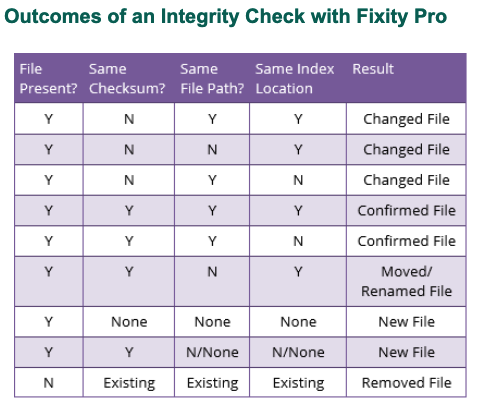
If the values match, the file remains unchanged. If they do not match, the file has been altered, and further investigation is required. This is the core mechanism of fixity verification.
When Should You Run Fixity Checks?
There is no universal schedule. The appropriate frequency depends on the size of your collection, the value of the material, and the consequences of loss.
However, there are clear moments when fixity checks are essential:
After transferring files from one system to another.
After exporting records from a database or repository.
After receiving files from a donor or office.
After migrating storage infrastructure.
Before and after long-term storage.
Many organizations conduct periodic audits of high-value content. Some run checks quarterly or annually. Larger institutions may automate fixity monitoring continuously within repository systems. The goal is not constant anxiety. The goal is documented verification.
What Happens If a Checksum Fails?
Fixity does not repair files. It alerts you. When a checksum comparison fails, the correct response is to check redundant copies. Responsible digital preservation always includes multiple copies stored in separate environments.
A common principle is to maintain at least three copies in at least two different storage locations. If one copy fails a fixity check, you compare it to the other copies. If one of those remains valid, you replace the corrupted version. Fixity works in partnership with redundancy. It is a monitoring tool, not a repair mechanism.
Introducing BagIt
BagIt is a hierarchical file packaging format widely used in digital preservation. It was originally developed in 2007 when the California Digital Library needed a reliable way to transfer large amounts of digital content to the Library of Congress. John Kunze formalized the specification through the Internet Engineering Task Force in 2008.
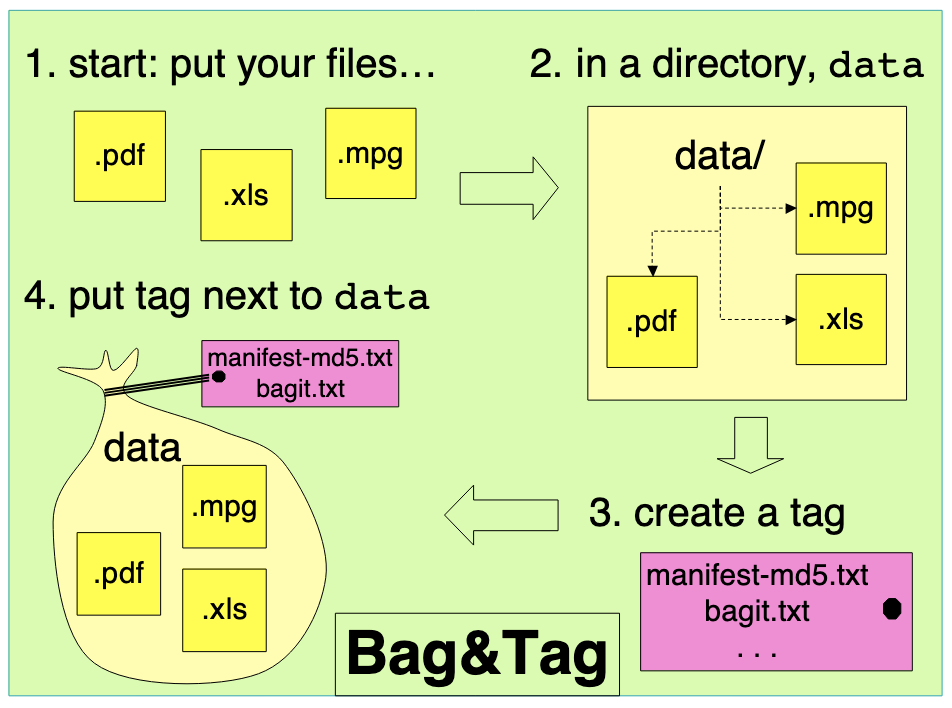
BagIt packages files together in a structured directory, called a bag, and includes metadata files that document the contents and record checksums.
A BagIt package typically includes:
A payload directory containing the actual content files.
A manifest file listing filenames and their checksums.
A bagit.txt file describing the bag format.
Optionally, a bag-info.txt file with additional descriptive metadata.
BagIt preserves directory hierarchy, which supports archival principles such as provenance and original order. More importantly, it embeds fixity information directly within the package.
Why Use BagIt Instead of a Zip File?
At first glance, BagIt may resemble a zip archive. Both bundle files together. The difference is that BagIt is designed specifically for long-term preservation and validation. A zip file compresses and packages files but does not inherently document or preserve fixity in a transparent, standardized way.
BagIt generates checksums for each file in the payload and stores them in a manifest. This allows the entire package to be validated at any time in the future. Because BagIt is open source and not proprietary, it avoids vendor lock-in and supports long-term accessibility.
BagIt is particularly well-suited for:
Transferring collections between institutions.
Exporting content from digital repositories.
Receiving large groups of files from donors or departments.
Moving files between storage environments.
In each case, BagIt provides structure and verifiable integrity.
Fixity and PREMIS
Fixity information does not exist in isolation. It is often recorded using preservation metadata standards.
PREMIS, which stands for Preservation Metadata Implementation Strategies, is the leading metadata standard for digital preservation. Within PREMIS, fixity is recorded as a message digest. PREMIS can capture not only the checksum value but also the algorithm used, the software that generated it, the verification date, and the outcome.
Recording fixity events in PREMIS supports chain-of-custody documentation. It creates a documented preservation history that demonstrates responsible stewardship over time. For institutions serious about digital preservation, fixity, BagIt, and PREMIS work together as components of a defensible framework.
The Larger Context of Digital Preservation
Fixity is sometimes compared to going to the dentist or taking your car to a mechanic. It is maintenance. It is preventative. It is rarely glamorous. But it is also what separates responsible stewardship from hopeful storage.
Digital preservation is not about putting files in the cloud and assuming they will remain intact. It is about actively verifying that they remain intact, documenting that verification, and maintaining enough redundancy to recover from failure.
Bit rot will occur. Hardware will fail. Software will change. Human error will happen. Fixity gives you early warning. BagIt gives you structured transfer and validation. PREMIS gives you documentation. Together, they form the backbone of a credible digital preservation program.
If your organization holds digital records that matter, this is not theoretical. It is operational. And it is worth doing correctly.
Want to learn more? Watch our webinar on Fixity + Bagit here: